
.webp?width=158&height=85&name=New-logo-Ourgreen%20(1).webp)

What Is the HubSpot Projects Object?
The HubSpot Projects Object is a native project management object built directly into HubSpot Smart CRM. It enables teams to:
- Create structured projects as CRM records
- Assign tasks with start and due dates
- Visualize timelines using Gantt, Board, or Table views
- Associate projects with Deals, Contacts, and Companies
- Automate project creation using workflows
In short, it brings true project management inside the CRM—eliminating the disconnect between Sales, Service, and Operations.

The Real Problem in B2B Operations
In most B2B organizations, Sales works inside the CRM while implementation and delivery teams operate in separate project management software. That split creates predictable friction:
- Duplicate data entry
- Misaligned timelines
- Poor handoffs after Closed Won
- Limited visibility across departments
For years, businesses have asked whether HubSpot would introduce native project management. With the launch of the Projects Object—including a Gantt chart view—that gap is finally closed.
If you are running a B2B SaaS company, agency, consultancy, or service firm, this release is strategically significant.

Core Features of HubSpot Projects
1. Interactive Gantt Chart View
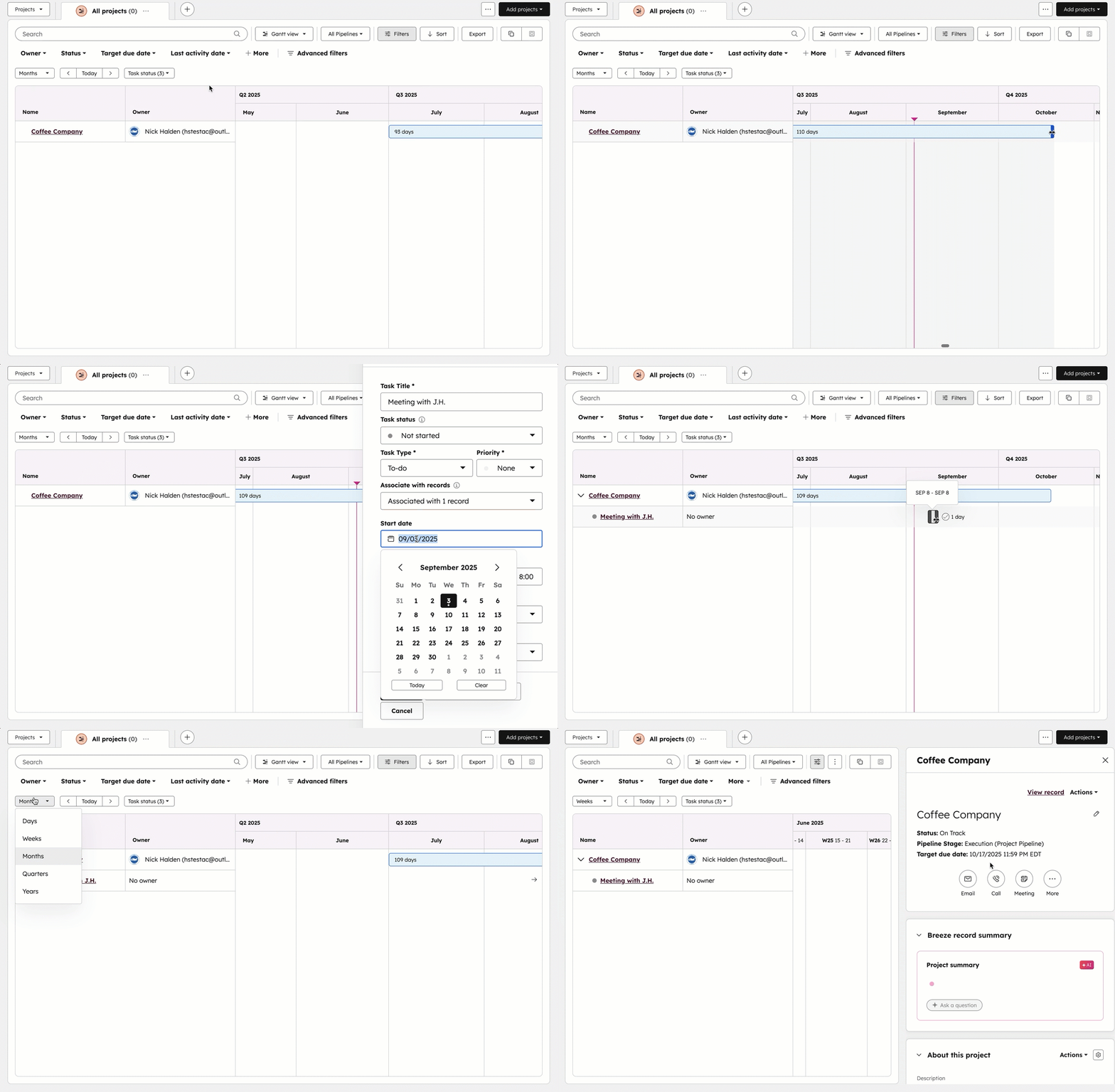
The Gantt chart allows teams to manage project timelines visually. You can:
- View all project tasks along a structured timeline
- Drag and adjust start or end dates directly in the chart
- Identify overlaps, delays, and bottlenecks instantly
This is especially valuable for multi-phase onboarding or implementation programs where sequencing matters.
2. True Task Management Inside the CRM
Traditional CRM tasks only supported due dates. Projects now introduce:
- Defined start dates
- Structured task hierarchies within projects
- Clear ownership assignment
- Timeline cascading beneath parent projects
This elevates HubSpot from task tracking to operational execution management.

3. Multiple Visualization Options
Different teams manage work differently. Projects supports:
- Gantt view for timeline-based execution
- Board view for stage-based progression
- Table view for structured oversight and reporting
This flexibility supports both Agile-style workflows and structured implementation pipelines.
4. Deep Native CRM Connectivity
Projects are not external integrations—they are standard CRM records. That means you can:
- Associate Projects with Closed Won Deals
- Link them to relevant Contacts and Companies
- Maintain notes, files, mentions, and communication history in one unified timeline
For B2B operations, this eliminates context switching and data silos.

High-Impact B2B Use Cases
1. Automated Client Onboarding
For SaaS companies and agencies, the transition from Sales to Customer Success is mission-critical.
Example workflow:
- A Deal moves to “Closed Won”
- A workflow automatically creates a Project
- Predefined onboarding tasks are generated
- Tasks are assigned to implementation specialists
- Timeline is plotted instantly in the Gantt view
This removes manual setup and ensures every new client follows a standardized onboarding framework.
Available on Professional and Enterprise tiers, workflow automation makes this fully scalable.

2. Structured Cross-Functional Service Delivery
Service organizations require stage gates and quality controls.
With Projects, you can:
- Build custom pipelines specific to delivery phases
- Prevent skipping critical stages
- Track Target Due Date vs. Completion Status
This transforms the CRM into an operational analytics engine, not just a revenue tracker.
Strategic Business Impact
Moving project management into HubSpot delivers measurable operational advantages:
- Reduced software stack complexity
- Improved post-sales visibility
- Faster onboarding cycles
- Clear accountability across teams
- Stronger data integrity
For B2B organizations aiming to consolidate systems and reduce tool sprawl, this is a major step forward.
How to Activate the Projects Object
To enable Projects:
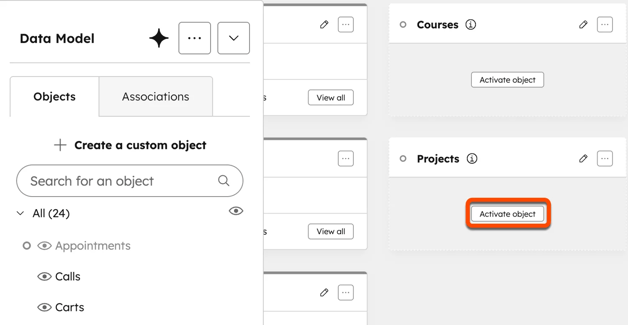
- Navigate to Data Management > Data Model
- Click Edit Data Model.
- Locate Projects and activate the object
- Click Confirm.
Access is available on eligible Starter, Professional, and Enterprise subscriptions (subject to account configuration).
Final Takeaway
Native project management inside HubSpot is more than a feature release. It represents operational unification.
By connecting Deals, onboarding workflows, service delivery, and reporting within one CRM ecosystem, B2B teams can execute structured project management without leaving their revenue platform.
For organizations serious about aligning Sales, Customer Success, and Operations, the HubSpot Projects Object is not just useful—it is strategically transformative.
Contact Us
Phone: 024-609-599
Email: contact@ourgreen.co.th
Website: ourgreenfish.com









.png)


No Comments