
.webp?width=158&height=85&name=New-logo-Ourgreen%20(1).webp)


What Are HubSpot Flexible CRM Views?
Flexible CRM Views allow users to change how CRM records are displayed without altering the underlying data structure.
Available view types include:
- Table view
- Board view (Kanban-style)
- Calendar view
- Gantt view
- Report view
- Map view
The core advantage: one centralized dataset, multiple visual interpretations.
This is part of HubSpot’s broader Smart CRM strategy, designed to reduce friction, improve visibility, and support role-based workflows.

Why This Update Matters
Traditional CRM list views create operational friction:
- Insights hidden in rows of data
- Limited visual pattern recognition
- Frequent exporting to spreadsheets
- Slower decision-making
- Workflow mismatches between departments
Flexible CRM Views eliminate the “one-size-fits-all” interface. Sales can manage pipelines visually, marketing can monitor deadlines on a calendar, and service teams can track lifecycle duration in Gantt view — all within the same object.
Overview of Each HubSpot CRM View Type
1. Map View: Geographic Visualization Inside HubSpot
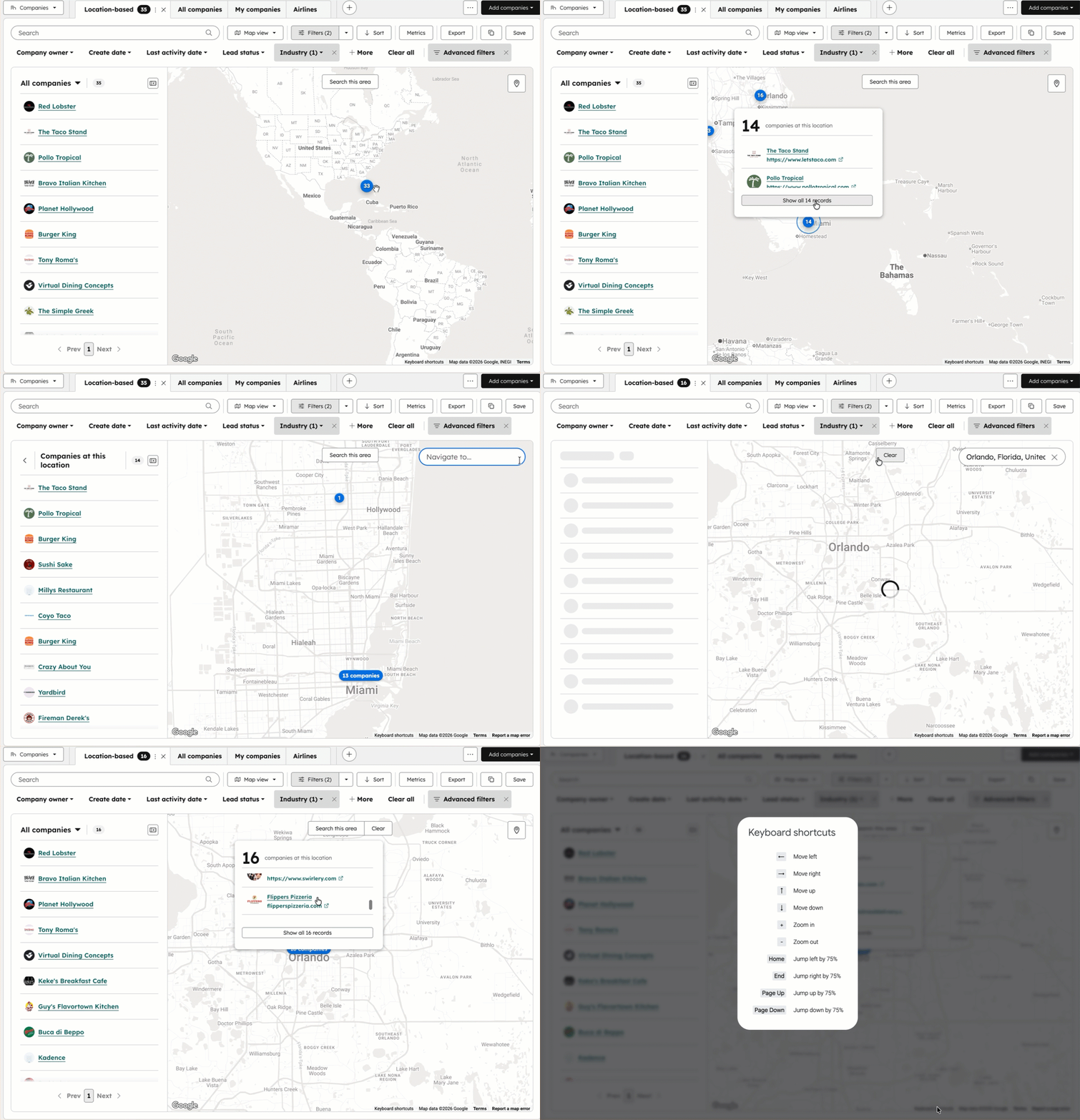
The Map view enables spatial visualization of CRM records using address-based properties.
Ideal for:
- Field sales teams
- Territory managers
- Regional growth planning
Example Use Case:
A sales manager identifies clusters of high-value prospects in a specific province or city and optimizes visit planning directly in HubSpot.
Strategic Benefit:
Eliminates the need for external mapping tools while improving territory coverage analysis.
2. Gantt View: Lifecycle and Duration Tracking
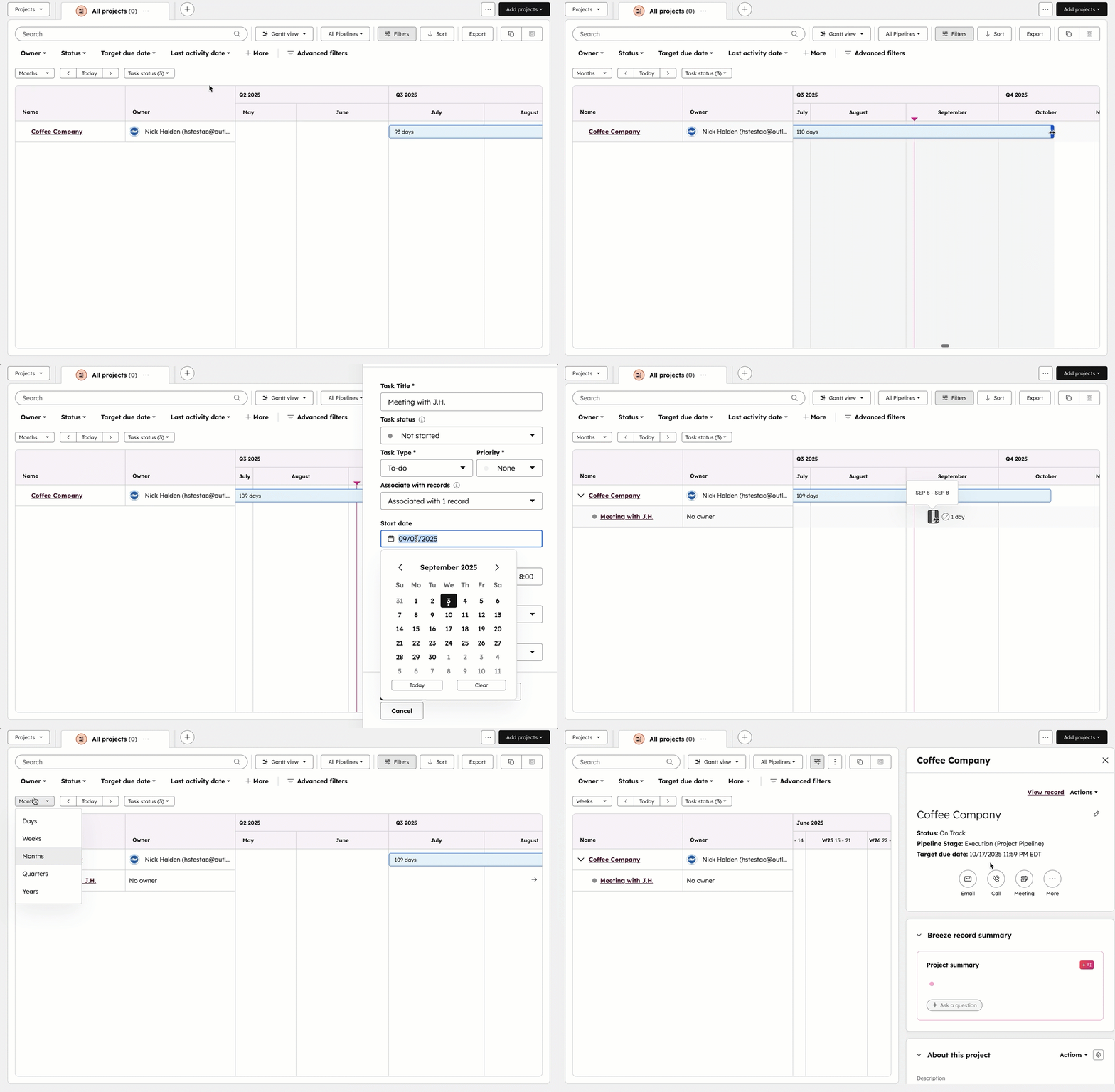
The Gantt view provides a timeline-based visualization of records over a defined date range.
Ideal for:
- Implementation teams
- Onboarding workflows
- Ticket lifecycle monitoring
- Project tracking
Example Use Case:
A service manager identifies long-running tickets and overlapping implementation schedules.
Strategic Benefit:
Makes bottlenecks visible immediately instead of burying them in date fields.
3. Board View: Kanban-Style Pipeline Management
The Board view presents records grouped by a property (such as deal stage or ticket status).
Ideal for:
- Sales pipeline management
- Ticket status workflows
- Stage-based tracking
Example Use Case:
Sales reps drag and drop deals between stages to reflect real-time pipeline movement.
Strategic Benefit:
Improves pipeline transparency and highlights stalled opportunities.

4. Calendar View: Date-Based Record Management
The Calendar view organizes records based on a selected date property.
Ideal for:
- Marketing campaign scheduling
- Renewal tracking
- Follow-up deadlines
- Content planning
Example Use Case:
A marketing team visualizes campaign launch dates and avoids scheduling conflicts.
Strategic Benefit:
Improves deadline visibility and reduces missed commitments.

5. Report View: Inline Analytics Without Separate Reports
The Report view allows users to generate chart-based insights directly from a filtered CRM view.
Ideal for:
- Lifecycle distribution analysis
- Funnel performance monitoring
- Segment-based reporting
Example Use Case:
A marketer reviews lifecycle stage distribution within a filtered contact segment without building a separate dashboard.
Strategic Benefit:
Accelerates insight generation and reduces report-building overhead.

How to Create a Flexible CRM View in HubSpot
Creating a Flexible CRM View requires no custom development.
Step-by-step process:
- Navigate to your CRM object (Contacts, Companies, Deals, Tickets, or Custom Objects).
- Click Create view.
- Select your preferred view type (Table, Board, Calendar, Gantt, Report, or Map).
- Apply filters using AND/OR logic.
- Choose visibility:
- Private view
- Team view
- Save.
Smart CRM and Breeze AI Integration
Flexible CRM Views are powered by HubSpot Smart CRM, with support from Breeze AI.
Breeze AI enhances CRM data quality through:
- Automated activity capture (emails, meetings, calls)
- Conversational enrichment
- Real-time property updates
This ensures that Board, Gantt, Calendar, and Report views reflect current data without heavy manual updates from users.
The result: higher data integrity with less operational effort.

Business Impact: Sales, Marketing, and Service Alignment
Flexible CRM Views improve:
- Cross-team visibility
- Workflow alignment
- Decision-making speed
- Operational transparency
Instead of exporting data or debating spreadsheet interpretations, teams act directly inside HubSpot.
This marks a shift from static CRM reporting to dynamic operational intelligence.
Final Assessment
HubSpot Flexible CRM Views represent a meaningful usability upgrade within the Smart CRM ecosystem.
By introducing Map, Gantt, Board, Calendar, and Report views across CRM objects, HubSpot enables teams to adapt the interface to their operational reality — without fragmenting data or relying on third-party tools.
If your organization depends heavily on CRM visibility for pipeline management, project tracking, or lifecycle analysis, this Fall Spotlight 2025 feature is worth implementing.
To explore:
Navigate to your CRM object → Click Create view → Select your preferred format → Apply filters → Save.
Your CRM should support how your team thinks and operate, not constrain it.
Contact Us
Phone: 024-609-599
Email: contact@ourgreen.co.th
Website: ourgreenfish.com











No Comments