


For business owners managing an outbound sales team, every minute spent on the phone translates directly to revenue potential. Yet, one of the most frustrating bottlenecks in high-volume Outbound Calls rarely gets the operational attention it deserves: unanswered calls.
When sales reps make outbound dials, a large percentage inevitably roll to voicemail. Leaving a high-energy, articulate, 30-second message 30 to 50 times a day drains rep stamina and consumes valuable prospecting hours.
To solve this operational drain, HubSpot introduced Manual Voicemail Drop—a native feature designed to give reps control, speed, and consistency without sacrificing message quality. Here is a comprehensive look at how it works, why it matters for business leaders, and how your team can implement it immediately.

What Is a Manual Voicemail Drop?
Manual Voicemail Drop is an integrated dialing feature within HubSpot that allows sales and service reps to leave pre-recorded voicemail messages with greater control and predictability.
Instead of reciting the same script repeatedly, reps wait for the prospect’s greeting to finish and listen for the audio beep. Once the tone sounds, the rep drops a pre-recorded audio message into the voicemail box in just two clicks.
Unlike fully automated systems that often guess when a voicemail machine starts—frequently cutting off the first three seconds of a pitch—the manual trigger ensures the audio message starts at the exact right moment.
Why It Matters for Outbound Calls and Revenue Teams
From an executive and sales leadership standpoint, this capability directly targets three key drivers of dialing efficiency:
- Reclaims Valuable Selling Time: Voicemail recitations are among the most repetitive manual tasks in outbound prospecting. Automating delivery saves 20 to 45 seconds per unanswered dial, allowing reps to redirect their focus toward live customer conversations and follow-ups.
- Delivers Consistent, High-Impact Messaging: Pitch delivery naturally deteriorates when reps are tired near the end of a calling block. Pre-recorded audio guarantees that every prospect receives a polished, well-paced, and error-free message every single time.
- Preserves Human Discretion: Reps choose precisely when to trigger the drop. This eliminates awkward overlaps or truncated messages, protecting your company's professional brand reputation.

System Prerequisites & Step-by-Step Configuration
To utilize Manual Voicemail Drop, your organization must satisfy two operational requirements:
- Calls must be placed using a HubSpot-provided phone number.
- Calls must be initiated directly via the Call icon located in the HubSpot top navigation bar.
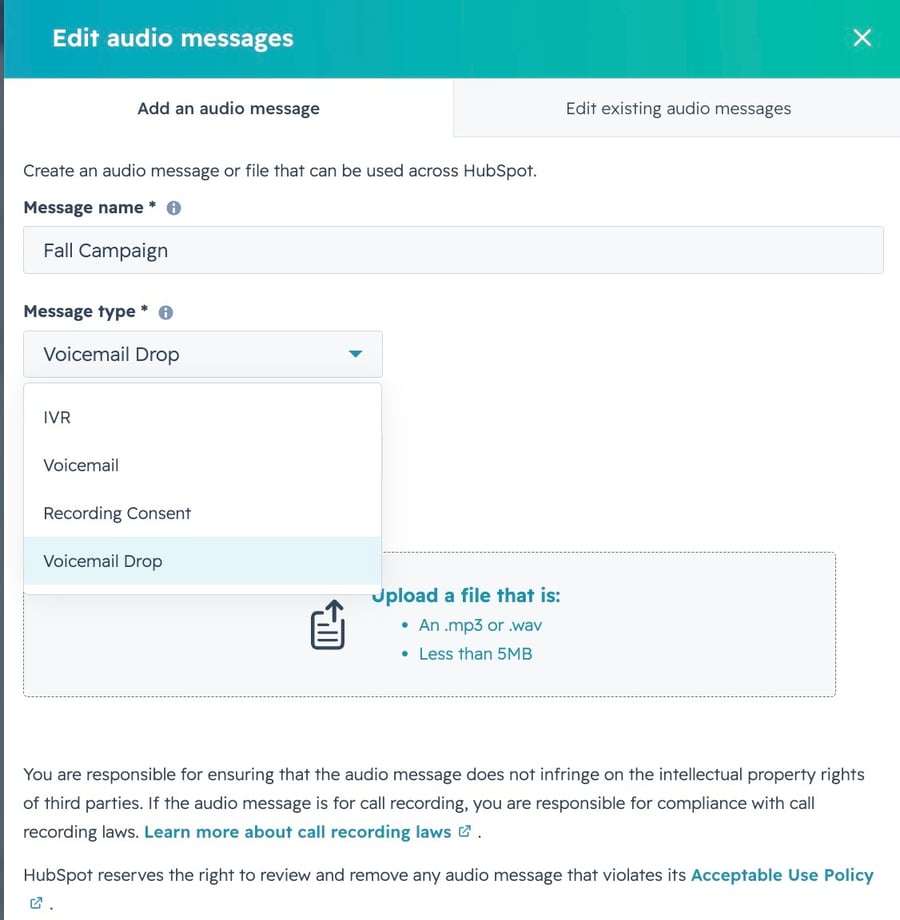
Step 1: Admin Setup
- Navigate to Settings > General in your HubSpot portal.
- Select the Calling tab.
- Click the Edit audio messages button.
- When the side panel slides out, enter a clear, descriptive Message name (e.g., "Standard Cold Outbound - Decision Maker").
- Under the message type selector, choose Voicemail Drop.
- Upload an audio file in MP3 or WAV format (must be under 5MB in size), then click Save.
Step 2: Rep Daily Workflow
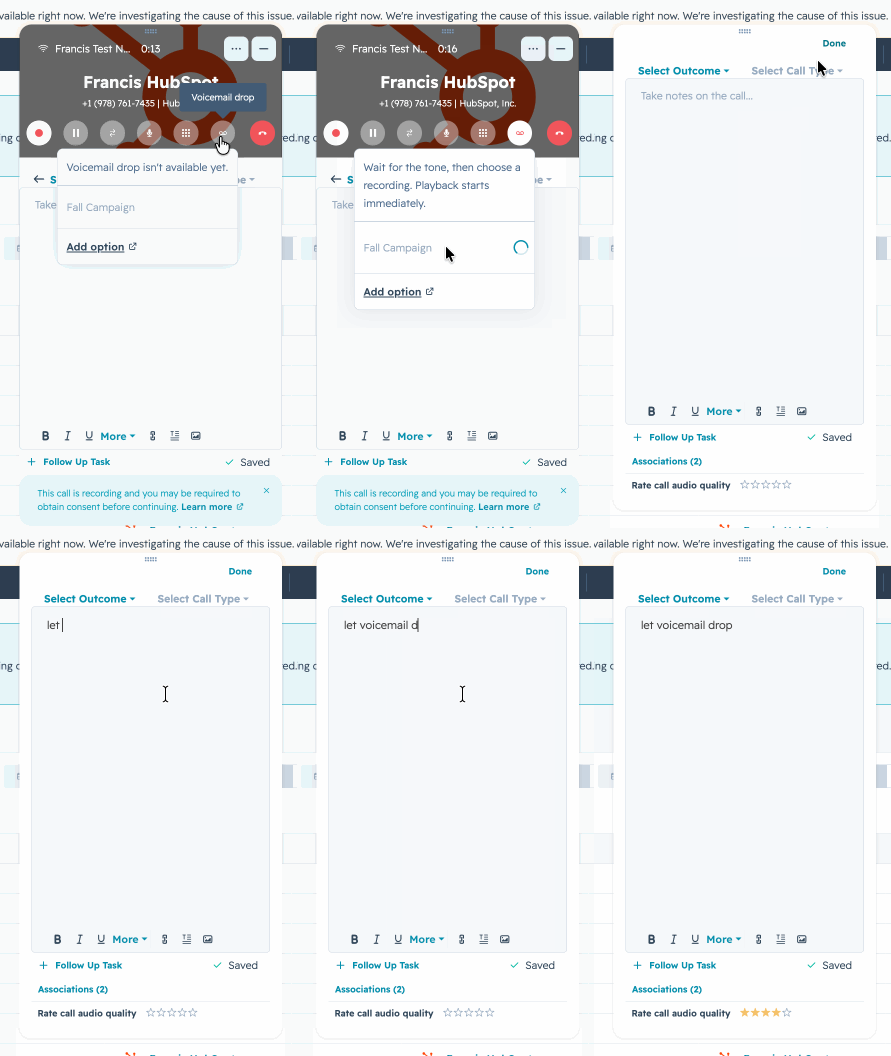
- Place an outbound call using the Call icon in the navigation menu via a HubSpot-provided number.
- Once the call successfully connects, a new Voicemail Drop button activates on the in-call control bar (it remains disabled until a live connection is established).
- Listen through the recipient's personal greeting.
- Immediately after hearing the beep, select the desired pre-recorded audio file from the dropdown.
- HubSpot instantly disconnects the rep's line—freeing them to review notes or dial the next contact—while continuing to deliver the audio message to the recipient's voicemail in the background.
Eligibility and Supported Tiers
This functionality is available across the following HubSpot tiers:
- Sales Hub Professional & Sales Hub Enterprise
- Service Hub Professional & Service Hub Enterprise

Final Takeaway
Scaling Outbound Calls requires removing friction from your team's daily operating rhythm. Manual Voicemail Drop provides a practical balance between workflow automation and human oversight, helping sales organizations maximize dial velocity while keeping message standards uncompromised.
References: HubSpot. (2026). Product Updates: Manual Voicemail drops for Outbound Calls. Retrieved from https://app.hubspot.com/l/product-updates/?rollout=334915
Read more articles: HubSpot Product Update: Customize your bookmarks for convenience and time saving (HubSpot Product Update: จัดลำดับ Bookmarks เอง สะดวกและประหยัดเวลา)

Contact us
Tel : 024-609-599
E-mail : contact@ourgreen.co.th
Website : ourgreenfish.com










No Comments