

A fundamental hurdle business owners and operations teams encounter with traditional automation is the "rule-complexity ceiling." Legacy systems depend entirely on rigid, deterministic logic (If-This-Then-That). As soon as an edge case arises—requiring nuanced evaluation, contextual interpretation, or qualitative judgment—the workflow halts. The unresolved task inevitably lands back on human team members, creating operational bottlenecks and capping business scalability.
With the release of Agent Builder's Workflows, that limitation has been removed. By bridging traditional process management with autonomous Custom Agents, businesses can now run end-to-end workflows that adapt dynamically to real-world scenarios.

What is Agent Builder, and Why Does It Matter?
Agent Builder provides a modern, unified visual canvas that houses triggers, actions, and custom AI agents running directly on top of your CRM data.
Historically, automation ended wherever human discretion was required. In the new Workflows framework, when a process becomes too complex for deterministic rules, the system hands the task off to an AI agent. The workflow pauses, waits for the agent to analyze the data and return an assessment, and then automatically proceeds down the appropriate branch.
Under the Hood: A Real-World "Customer Health" Workflow
To illustrate how this functions within an organization, consider a practical customer retention workflow built on the visual canvas
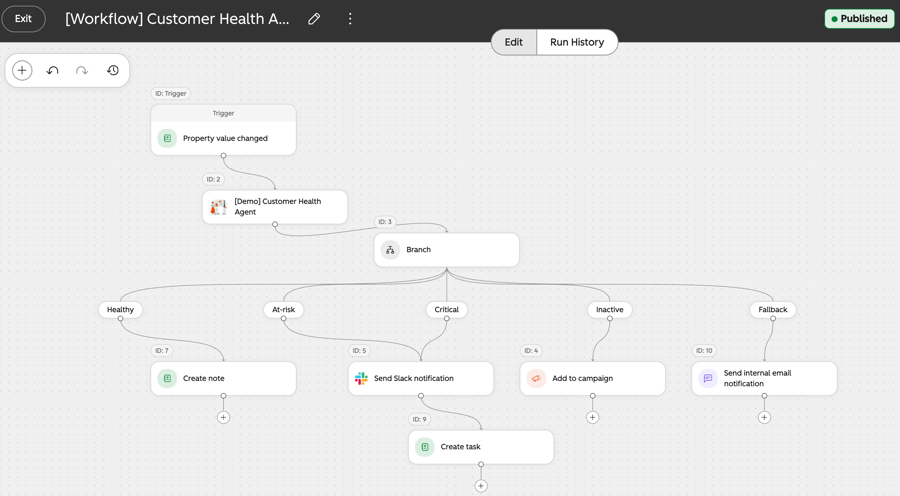
- The Trigger: The workflow initiates automatically whenever a monitored CRM attribute updates (Property value changed).
- The Agent Handoff: The record passes directly into [Demo] Customer Health Agent, which assesses account activity and evaluates retention health without requiring manual review by a customer success manager.
- Intelligent Branching: Once the agent completes its evaluation, it outputs a discrete classification that routes the workflow down dedicated branches:
- Healthy: The system records an internal note on the account (Create note).
- At-Risk & Critical: The workflow triggers an immediate alert via Slack (Send Slack notification) and assigns an actionable follow-up item to the team (Create task).
- Inactive: The customer is automatically enrolled into a re-engagement workflow (Add to campaign).
- Fallback: Any edge cases that fail to match standard definitions trigger a notification to the internal team (Send Internal email notification) to ensure no accounts slip through undetected.

The Core Value for Business Leaders: Strategic 'Optionality'
The primary technical breakthrough of Agent Builder is optionality—offering granular control when desired and autonomous discretion when required:
- Universal Ingestion: Workflows can be initiated from scheduled triggers, incoming webhooks, third-party system events, or standard CRM record updates.
- Granular Governance: Administrators retain full control over each execution step, benefiting from enhanced visual tools compared to legacy workflow builders.
- Eliminating Manual Bottlenecks: When a process reaches a degree of ambiguity where binary rules fail, the embedded AI agent steps in to maintain momentum, ensuring automated processes do not stall.

How to Get Started
Access to Agent Builder is managed directly through the Agent Hub, with two primary paths to configuration:
- Prompt-Driven Setup with Breeze Assistant: Teams can leverage Breeze Assistant, HubSpot’s native conversational LLM, to outline workflow architectures through conversational prompts.
- Visual Canvas via 'Create': Users can click Create in the upper right corner to build a Custom Agent independently or build a Workflow, where existing agents can be embedded or designed directly alongside execution steps.

Availability
Agent Builder Workflows are available across Professional and Enterprise tiers, including:
- Professional: Smart CRM, Sales Hub, Service Hub, Marketing Hub, and Data Hub.
- Enterprise: Smart CRM, Sales Hub, Service Hub, Marketing Hub, and Data Hub.
By integrating agentic evaluation directly into operational workflows, businesses can move beyond basic text generation and deploy AI where it delivers compounding value: executing contextual operational decisions at scale.
Reference: HubSpot. (2026). Agent Builder's Workflows are Live. Retrieved from https://app.hubspot.com/l/product-updates/?rollout=290899
Read more articles: HubSpot Product Update: Customize your bookmarks for convenience and time saving (HubSpot Product Update: จัดลำดับ Bookmarks เอง สะดวกและประหยัดเวลา)

Contact us
Tel : 024-609-599
E-mail : contact@ourgreen.co.th
Website : ourgreenfish.com








No Comments