
.webp?width=158&height=85&name=New-logo-Ourgreen%20(1).webp)

Greetings, business owners. Have you ever wondered why top sales reps always seem to call at the "right place and right time" as if they have a sixth sense? Meanwhile, our own teams might be wasting countless hours cold-calling lists of prospects who have absolutely zero intention of buying our products.
The secret to exponential business growth in the AI era is no longer casting a wide net, but accurately capturing Customer Intent Signals—long before the customer decides to buy from a competitor or walks away completely.
This article will take you on a deep dive into elevating your customer-reading capabilities to the next level. Because in a business world where every industry has its own unique nuances, generic, one-size-fits-all signals just aren't enough anymore.
When Generic Signals Fall Short: Welcome to the Era of "Custom Signals"
Traditionally, Customer Intent Signals might refer to basic behaviors like website visits, email opens, or E-book downloads. But for B2B or niche businesses, these signals are often simply "too broad."
The good news is that a leading CRM like HubSpot has recently released a new update called Custom Signals in Buyer Intent. This feature allows you to create highly specific, niche triggers using plain language. You simply describe what matters to your business, and the AI-powered system will surface companies that match your criteria, complete with full source citations.

Why is this a game-changer for business owners?
Let's look at how setting up Custom Signals can massively impact your sales performance:
1. Track niche-specific triggers Your business isn't generic, and your signals shouldn't be either. This feature allows you to track ultra-specific movements. For instance, if you sell cybersecurity solutions, you can set a signal to track "companies hiring for their IT or Cybersecurity team." Just describe it in a single sentence, and the system will start tracking it immediately.
2. Sharpen standard signals Instead of just tracking generic news like "which companies got funding," you can create Customer Intent Signals that are razor-sharp. For example: "Series A funding for green-tech startups mentioning sustainability on their homepage." This level of accuracy will filter out almost 100% of your junk leads.
3. Arm sales with a "reason to call" There is nothing worse than a sales rep making a call without knowing what to talk about. Custom signals give your reps high-fidelity outreach triggers that indicate a real, immediate need for your specific product or service.
4. Create efficiency and consolidation Forget about manual Google searches to track prospect news or paying for multiple third-party intent data tools. This CRM-native agentic intent solution consolidates everything into a single, efficient platform.
How Does the Customer Mind-Reading System Work?
The interface is designed to be incredibly user-friendly. You don't need to write code or be a prompt engineering expert. You can access it directly via the buyer intent app under the "My Signals" tab.
Step 1: The Prompt You can describe the exact signal you are looking for using everyday plain language.
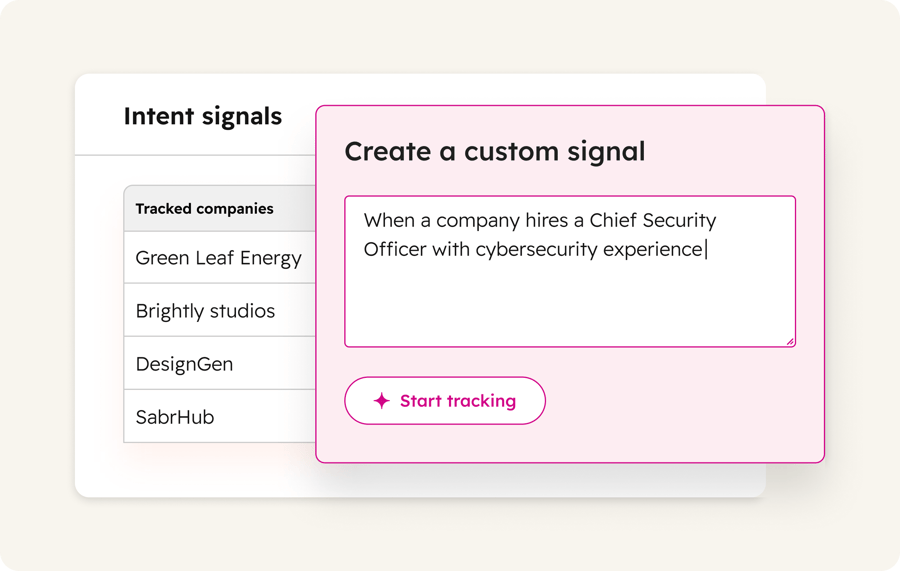
Image Example: Setting the system to track "When a company hires a Chief Security Officer with cybersecurity experience." The system is ready to start tracking immediately.
Step 2: Test & References Before activating a signal, you can see an auto-generated preview of companies that triggered your custom criteria over the last 90 days to verify accuracy.
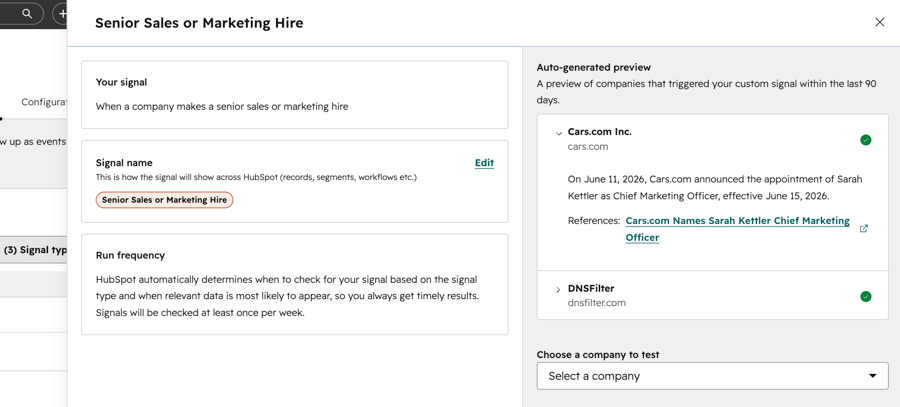
Image Example: The system detects that Cars.com recently appointed a new CMO, attaching direct reference links. Sales reps can click to read the full context immediately. This kind of accuracy beats guesswork every time.
Additional Step: Track Company-Level Signal Activity You can zoom into individual target company records to see their specific Intent Signal history. The system organizes detected activities chronologically—such as executive hires or product redesign announcements—complete with source references.
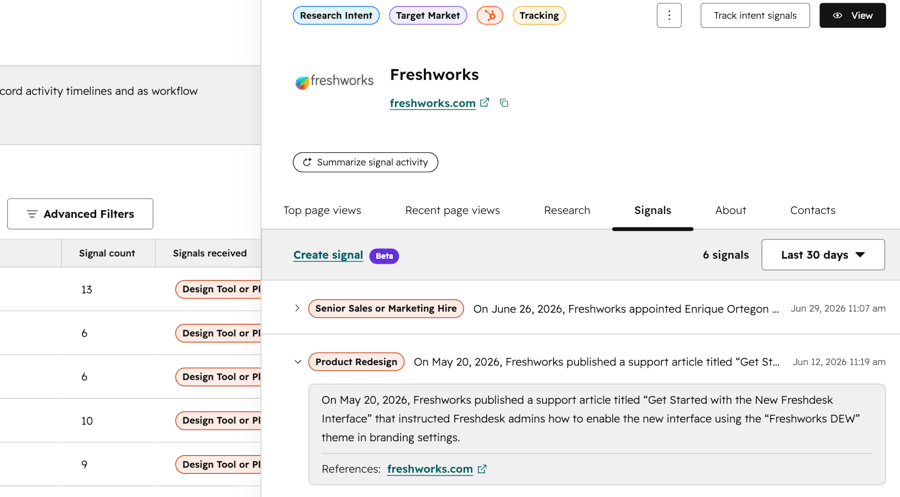
Image Example: Viewing the profile of Freshworks, where the system has flagged multiple signals, including a Senior Sales or Marketing Hire and a Product Redesign announcement. This gives sales reps full context before engaging.
Step 3: Activate and Automate Once you have dialed in your accurate [Customer Intent Signals], you can use them everywhere across your CRM—whether it's for building segments, triggering workflows, or adjusting lead scoring.
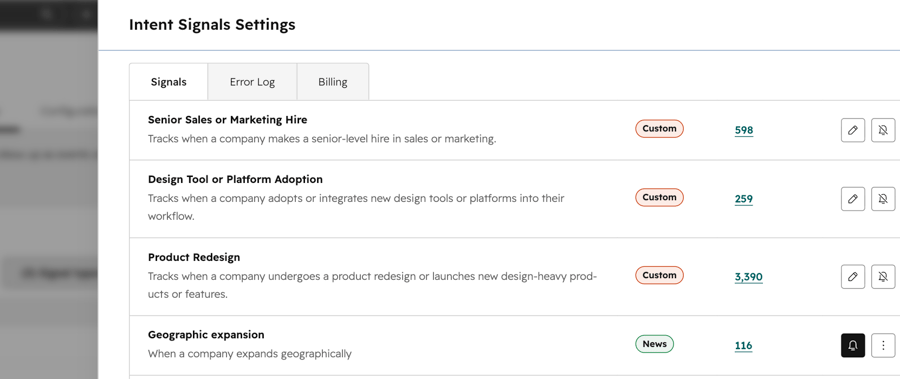
Image Example: A dashboard summarizing how many companies met specific conditions, such as making a Senior Sales or Marketing Hire (598 companies), Design Tool Adoption (259 companies), or a Product Redesign (3,390 companies).

The Bottom Line for Business Owners
In an era overloaded with data, whoever can leverage information to read the customer's mind the fastest wins. Implementing Customer Intent Signals in the form of Custom Signals isn't just about having modern tools; it's a fundamental mindset shift for your sales and marketing teams. You transition from "chasing after customers" to "intercepting them at the exact moment they need you."
This feature is now available to all HubSpot customers with HubSpot credits. If you are a business owner looking to boost your closing rates and eliminate wasted effort from your team, this is a technology you absolutely cannot afford to miss!

References HubSpot. (2026). Product Updates: Custom Signals in Buyer Intent. Retrieved from https://app.hubspot.com/l/product-updates/?rollout=285012
Read more articles: HubSpot Product Update: Customize your bookmarks for convenience and time saving (HubSpot Product Update: จัดลำดับ Bookmarks เอง สะดวกและประหยัดเวลา)

Contact us
Tel : 024-609-599
E-mail : contact@ourgreen.co.th
Website : ourgreenfish.com











No Comments