
.webp?width=158&height=85&name=New-logo-Ourgreen%20(1).webp)

In an era where everyone is talking about leveraging AI to analyze customer behavior and skyrocket sales, the most critical question you must answer before investing heavily in new technology is: How "clean" and "ready" is the Customer Data currently sitting in your system?
The golden rule of AI and Machine Learning is simple: "Garbage In, Garbage Out." If you feed these systems messy data, filled with blank fields or redundant information, the AI's output will be highly inaccurate and practically useless in the real world. Today, we are diving deep into why conducting a Data Model Health Check is the most crucial lifesaving procedure for your Customer Data before you step fully into the AI battlefield.

Why Does Customer Data in Your CRM Turn Into "Data Trash"?
Over time, the CRM systems you use to store Customer Data tend to accumulate a massive amount of unused digital clutter. This includes Properties (data fields) that no one ever fills out, Objects that were created and abandoned, and Sales Pipelines with convoluted or misconfigured stages.
When these issues go unnoticed and pile up, it becomes increasingly difficult for your team to find and utilize reliable data. This directly impacts your Go-to-Market strategies. Most importantly, it completely prevents AI from pulling high-quality Customer Data to perform accurate Predictive Analysis or craft seamless Personalization for your prospects.
What is a Data Model Health Check? The Lifesaver for Your Customer Data
A Data Model Health Check is a powerful new feature (referenced from the latest global CRM updates by HubSpot) that acts like a specialized doctor for your database. The system automatically scans your account’s Properties, Objects, Associations, Pipelines, and Lifecycle Stages.
Once the scan is complete, it surfaces flagged issues along with "Recommended Actions" that you can click to resolve directly from the page. This feature gives you a crystal-clear picture of what is working well within your Customer Data, what is broken, and exactly what needs to be fixed so your data model remains pristine as your business grows.

What Anomalies Can This Feature Detect in Your Customer Data?
To ensure your Customer Data is perfect and highly AI Search-friendly, the Health Check dives deep into 5 main pillars:
1. Properties AI requires dense, updated information. The system helps scan and flag:
- Properties with low fill rates.
- Inactive properties with absolutely no usage.
- Potential duplicate data caused by similar property labels.
- Mismatches between fill rates and actual usage (e.g., properties with high fill rates but low usage, or low fill rates in critical workflows).
2. Objects The system identifies Custom or toggleable Objects that have very few records or no associations at all. This is a strong indicator of abandoned or misconfigured elements within your Customer Data structure.
3. Associations It catches association types with exceptionally low record counts, signaling that this particular set of Customer Data relationships may no longer be serving its originally intended purpose.
4. Pipelines The system detects sales pipelines with highly unusual stage configurations. This includes pipelines that drag on with 20 or more stages, pipelines missing crucial "closed" stages, or stages that have absolutely zero records flowing through them.
5. Lifecycle Stages It surfaces Lifecycle Stages that currently hold zero records, allowing you to streamline and consolidate your Customer Data architecture for maximum efficiency.
How to Start Checking Your Customer Data Health
If you are using HubSpot, you must be a Super Admin or Partner Admin to utilize this feature (available across all Hubs and Tiers). Here is the simple step-by-step process:
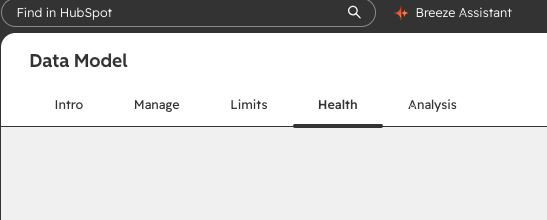
- On the left navigation bar, click Data Management > Data Model > Health.
- Navigate to the Health tab. On your very first visit, the health check will run automatically (this takes a few minutes to complete).
- Once the scan is done, flagged issues in your Customer Data will appear with recommended next steps for each finding. Where available, you can take action and fix them directly from the page.
- To ensure everything is perfect after making fixes, simply click Run health check to re-scan the system.
Conclusion for Business Owners Having clean Customer Data is no longer just about digital tidiness; it is a massive "competitive advantage" in an era where AI is your business's ultimate assistant. Start your Data Model Health Check today to ensure that every piece of customer information you own is primed and ready to be transformed into future sales and revenue!

Reference: HubSpot. (2026). Product Updates: Data Model Health Check. Retrieved from https://app.hubspot.com/l/product-updates/?rollout=318926
Read more articles: HubSpot Product Update: Customize your bookmarks for convenience and time saving (HubSpot Product Update: จัดลำดับ Bookmarks เอง สะดวกและประหยัดเวลา)

Contact us
Tel : 024-609-599
E-mail : contact@ourgreen.co.th
Website : ourgreenfish.com











No Comments