.webp?width=158&height=85&name=New-logo-Ourgreen%20(1).webp)

.png)
Driving search rankings and brand visibility relies heavily on accurate insights. However, many business owners face a common bottleneck: once you get those great insights or recommendations, turning them into actual content, writing briefs, or building campaigns takes forever. It is tedious, fragmented, and often means missing out on timely market opportunities.
Fortunately, a brand-new feature is here to break that bottleneck and scale your efficiency. You can now create campaigns in Marketing Studio directly from your AEO recommendations. This seamlessly bridges the gap from insight to published content within a single workflow.
Let’s dive deep into how this feature works and how it can elevate your business.

From AEO Recommendations to Winning Campaigns in One Click
Imagine the old way of doing things: taking an AEO recommendation, brainstorming the angles, creating an outline, handing it off to the content team to write a brief, and starting a blog post entirely from scratch.
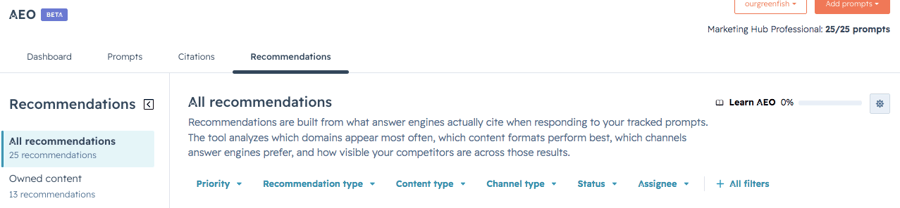
HubSpot's latest update completely reimagines this process. You can now build a campaign in Marketing Studio directly from your AEO recommendations. Simply select one or more blog recommendations in the AEO tool, and the system instantly generates a campaign for you.
The best part? It isn't just an empty template. Your new campaign comes pre-loaded with a pre-filled brief and AI-created blog posts mapped out on your Canvas. They are ready for your review, editing, and immediate publication—a massive time-saver for fast-moving businesses.

Why Business Owners Can’t Afford to Miss This Feature
If you are wondering how this impacts your bottom line, the answer lies in seamless, effective execution. This system is designed to make creating AEO-aligned campaigns easier than ever.
Here are the primary benefits your business will gain:
- Direct Access: Transition instantly from AEO recommendations straight into an active Studio campaign without switching back and forth between tools.
- Context-Driven Briefs: The campaign brief is automatically populated (auto-populated) with the exact AEO context, keeping your content hyper-focused on what search engines are looking for.
- A Complete Business Loop: It bridges the gap from raw insight to published content, leading to a measurable increase in your brand's authority—what we call a "Measurable Citation Lift." Everything is handled in a single loop, saving your business massive amounts of time and money.
Step-by-Step Guide: How It Works
The workflow is incredibly intuitive. Even if you aren't managing the day-to-day marketing operations yourself, your team can master this process in minutes:
- Review Insights: Navigate to Marketing > AEO and review your live AEO recommendations.
- Select Your Target: Check the box next to one or more blog recommendations you want to act on.
- Create the Campaign: Click the "Create Campaign" button. If your account manages multiple blogs, a quick pop-up will ask you to select which blog you want to publish to.
- Processing: You will see a processing screen while Marketing Studio works its magic to build your campaign assets.
- Manage on the Canvas: Once ready, you will be taken to the Marketing Studio canvas. Here, you’ll find your pre-filled brief and blog posts mapped out as assets. While the AI generates the blog posts, loading placeholders will temporarily appear. These will automatically swap into real asset nodes once the content is ready.
- Refine and Publish: From here, you can edit the brief, polish the content using the built-in editor, add more assets to the campaign, or hit publish. Want to publish somewhere else? Just click the three dots (...) and select "Copy contents as text" or "Copy contents as markdown" to take your content on the go.

Key Considerations & Rules of Engagement
To keep your marketing strategy accurate and effective, keep these essential guardrails in mind:
- Currently in Beta: This feature currently only supports "Blog posts." Support for additional content types is coming down the pipeline soon.
- Drafts by Default: AI content is always generated as a "Draft" so you and your team can review, fact-check, and refine the tone before anything goes live.
- External Publishing Requires Manual URL Input: If you choose to copy the text and publish outside of HubSpot, you must manually paste the live URL back into the system. Otherwise, the AEO observability tracking won't be able to measure your metrics accurately.

Who Gets Access?
This productivity-boosting tool is currently available for businesses utilizing the following HubSpot tiers:
- Marketing Hub Professional
- Marketing Hub Enterprise
If your account fits the bill, jump in and try turning your AEO recommendations into your first automated campaign today. Gain a competitive edge and give your marketing team hours of their time back!
References: HubSpot. (2026). Marketing Studio: Create campaigns from AEO recommendations. Retrieved from https://app.hubspot.com/l/product-updates/?rollout=310929
Read more articles : HubSpot Product Update: Customize your bookmarks for convenience and time saving (HubSpot Product Update: จัดลำดับ Bookmarks เอง สะดวกและประหยัดเวลา)

Contact us
Tel : 024-609-599
E-mail : contact@ourgreen.co.th
Website : ourgreenfish.com





No Comments